The last time I talked about the home lab, and this phase, I was talking about failure. And then the lab project went on a short term wait, until I could afford a box. Which was why I had posts about other things.
Tag Archives: tools
vmware problem trying to share bridged interface
I’ve spent the last 2 days trying to get Vmware Player on a Windows 7 host, to provide internet to any of the guests using bridged mode. I have 2 firewalls installed. Windows firewall, and Avast’s Firewall (part of the Internet Security Suite). I had both installed previously before I rebuilt my laptop in September, and didn’t have a problem or had to do anything.
If I turned off one of the firewalls it worked fine, for bridged interfaces. But with both on, it didn’t work. Even though there are rules in place for avast to allow vmware.
After digging I finally found a thread dealing with the same issue on VirtualBox. The fix is to turn on Internet Connection Sharing in Avast. This doesn’t turn it on for Windows but just Avast from what I can tell.
Designing a new home lab
I used to have a home lab of 3 cisco routers, and 3 cisco switches. That was for my CCNA training. Problem was, they were so old, they were not worth it. The lab also had 2 Intel 32-bit PC towers and a Sun Ultra 10. The Sun box was to get the Sun certification, but never got around to it. That isn’t to say that the lab wasn’t used. Just not used for the reasons I originally bought the components for.
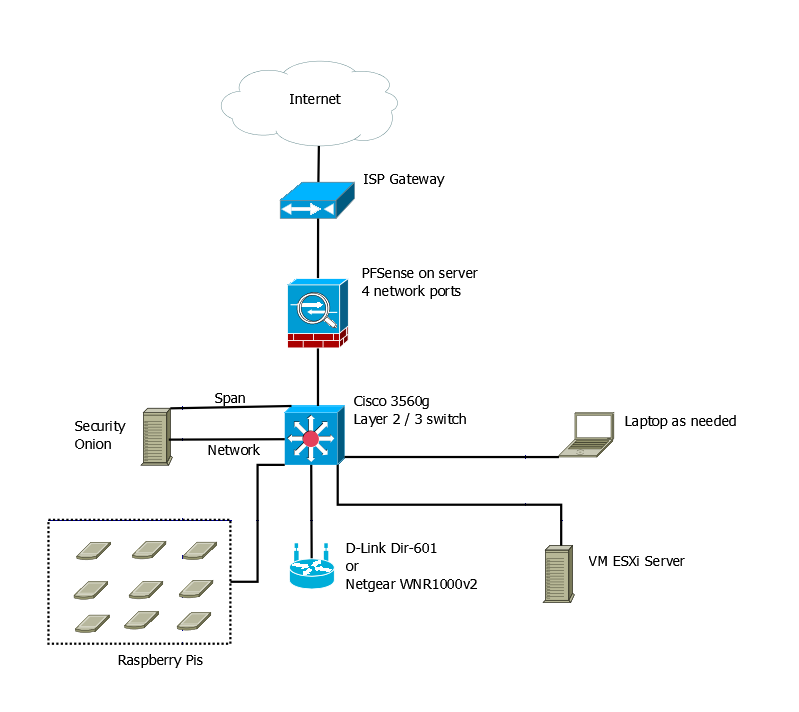
Now, since I graduated and I have money to spend on building a new lab, I’m looking at getting something new set up. After watching Johnny X(m4s) and Eve Adams recorded talk from Derbycon. I decided on the following design.
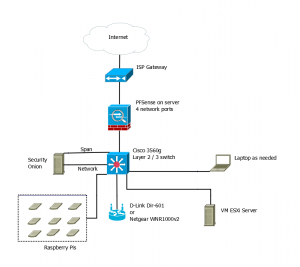
So this will be on a separate internet connection from my home network. That means getting a second line to the house, but it doesn’t have to be the fastest line in the world.
The hope is to have the PFSense box, the Security Onion Box, and the Vmware ESXi box all running on Micorservers. The price for the Lenovo ones are decent.
I want a Cisco 3560g switch for Gig out all the ports, plus the layer 2 / 3 routing. Again the price isn’t too bad, about the same as the Microsevers. Lastly if I decide to go for the CCNA again, it should be useful.
The wireless access point was chosen from the Offensive Security WiFu class hardware list. I could use my old Linksys WRT54GL with dd-rwt on it. But it cant’ do N. Granted it looks like the Off-Sec recommended ones are only half N.
Lastly, it would be nice to have a peg board with all my Raspberry Pi devices attached to it. Requires being easy to remove them, but not a big issue. This would give me a place to have them while working and store them when not in use. If I can get POE on the 3560g, that means I can get a POE splitter and adapter for each Raspberry Pi, and don’t have to worry about power there either.
The laptop would be as needed device. I could use my current one or buy one to dedicate to the lab. Mainly it’s there for user interface purposes than anything else.
The only downside, even though I’m not paying for college classes out of pocket any more, is that it will take a while to build this lab. I’m going to have to piece it together a little at a time.
Real-Time Rogue Wireless Access Point Detection with the Raspberry Pi
So I mentioned this previously as a teaser, but I had an article posted in the Linux Journal. It was based off my independent study at Eastern Michigan University.
It was in the December issue of the Linux Journal. Now it’s posted on their website.
This is related to the talk I am submitting for conferences this year. It has already be accepted to one conference. The talk has a little more information built in to it. For example the experience I had in an environment with heavy wifi coverage compared to home and Eastern Michigan University. A slight design modification. I don’t know yet if I’m going to rebuild using Raspberry Pi B+ or the new Raspberry Pi 2 model B.
Thinking about Tor consumer boxes
Thinking about the devices that are supposed to make it possible for Tor user friendly for mass market consumers. These are boxes like the Onion Pi, Anonabox, TorFI, Cloak, etc. I think the designers are missing a few things.
Raspberry Pi projects
Back in May and June, I did a project for school with 6 Raspberry Pis to build a WIDs. It went good. I wrote an article, I’m waiting to hear back if it’ll get published.
After the project, I had 6 Raspberry Pis kicking around. I have a project I want to work on, that could lead to another article. I just need to build my skills up to that first.
To get there, I wanted to build an Onion Pi. This will tie in to another project I’m working on. As some of you know I’m a fan of The Onion Router (TOR), especially when I’m doing Intelligence related research. The Onion Pi would be a good thing to have in the bag of tricks.
To get the Onion Pi working, I needed to go through the Adafruit Wifi Access Point. This is the second time I build an AP. This one is just a little different than last time. This time instead of an Edimax wireless card, I went with one of my TP Link TL-WN722Ns. I wanted the external antenna. I was using the 2014-09-09_wheezy_raspbian image.
Hostapd didn’t work right. It kept throwing errors on start about nl80211 not being a known driver. I had to build hostapd from source, which needed to have libssl-dev and libnl-1.1 installed, to get hostpad to build right. Then I needed to copy my built version into the right place.
I also had problems with isc-dhcp-server and tor starting. It looks like wlan0 isn’t starting properly. I’ll have to troubleshoot it more later. Adafruit has a comment about disabling wpa_supplicant. I don’t know if that will fix the problem though. I’ll follow up after.
On Writing Well by William Zinsser
I picked up “On Writing Well” by William Zinsser (Amazon affiliate link), a little over two years ago. The book came up as something worth reading by a professor. It’s been one of those books I always meant to get to, but could never find the time.
Incognito Toolkit by Rob Robideau
A while back I grabbed copies of both Practical Anonymity — link goes to my review — and the Incognito Toolkit (Amazon affiliate link), I think the former should have been more like the latter. The biggest complaint I had about Incognito was that it was self published. It showed in the writing.
Practical Anonymity by Peter Loshin
I got a copy of Practical Anonymity by Peter Loshin a while back via O’Reilly, had a sell on it. I finished it about two weeks ago. For what it sounded like it would be, I’m disappointed. I was expecting something more along the lines of “How to be Invisible”. For what it was, it was pretty good.
Duo’s two factor was easy
Finally got around to setting up two factor auth on the blog, using the Duo Security Plugin. Took less than 5 minutes, like their video at the plugin site said. I remember the SSH being harder to set up than that.
