Category Archives: administration

vmware problem trying to share bridged interface

I’ve spent the last 2 days trying to get Vmware Player on a Windows 7 host, to provide internet to any of the guests  using bridged mode.  I have 2 firewalls installed. Windows firewall, and Avast’s Firewall (part of the Internet Security Suite). I had both installed previously before I rebuilt my laptop in September, and didn’t have a problem or had to do anything.

If I turned off one of the firewalls it worked fine, for bridged interfaces. But with both on, it didn’t work. Even though there are rules in place for avast to allow vmware.

After digging I finally found a thread dealing with the same issue on VirtualBox. The fix is to turn on Internet Connection Sharing in Avast. This doesn’t turn it on for Windows but just Avast from what I can tell.

Designing a new home lab

I used to have a home lab of 3 cisco routers, and 3 cisco switches. That was for my CCNA training. Problem was, they were so old, they were not worth it. The lab also had 2 Intel 32-bit PC towers and a Sun Ultra 10. The Sun box was to get the Sun certification, but never got around to it. That isn’t to say that the lab wasn’t used. Just not used for the reasons I originally bought the components for.

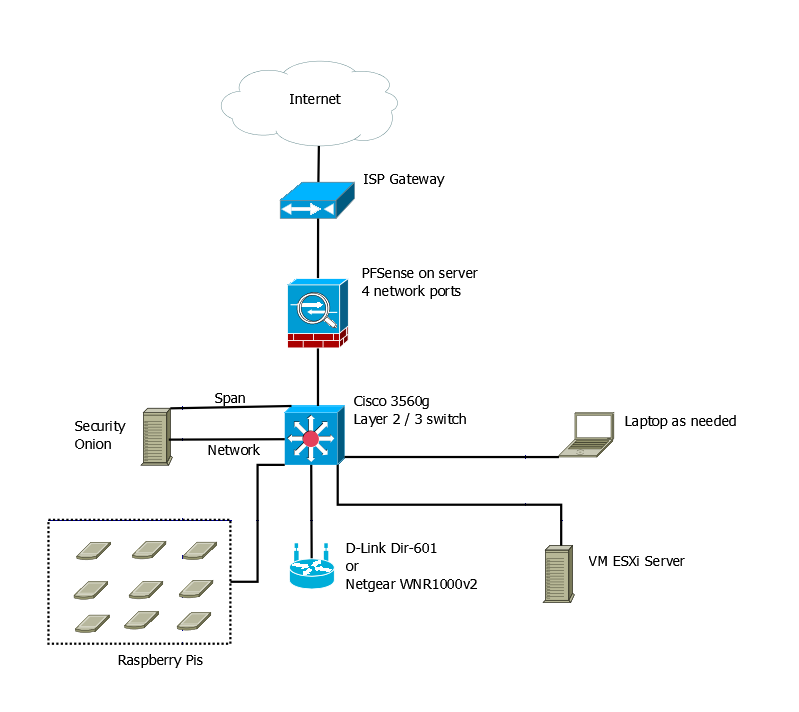
Now, since I graduated and I have money to spend on building a new lab, I’m looking at getting something new set up. After watching Johnny X(m4s) and Eve Adams recorded talk from Derbycon. I decided on the following design.

Lab Design v1

So this will be on a separate internet connection from my home network. That means getting a second line to the house, but it doesn’t have to be the fastest line in the world.

The hope is to have the PFSense box, the Security Onion Box, and the Vmware ESXi box all running on Micorservers. The price for the Lenovo ones are decent.

I want a Cisco 3560g switch for Gig out all the ports, plus the layer 2 / 3 routing. Again the price isn’t too bad, about the same as the Microsevers. Lastly if I decide to go for the CCNA again, it should be useful.

The wireless access point was chosen from the Offensive Security WiFu class hardware list. I could use my old Linksys WRT54GL with dd-rwt on it. But it cant’ do N. Granted it looks like the Off-Sec recommended ones are only half N.

Lastly, it would be nice to have a peg board with all my Raspberry Pi devices attached to it. Requires being easy to remove them, but not a big issue. This would give me a place to have them while working and store them when not in use. If I can get POE on the 3560g, that means I can get a POE splitter and adapter for each Raspberry Pi, and don’t have to worry about power there either.

The laptop would be as needed device. I could use my current one or buy one to dedicate to the lab. Mainly it’s there for user interface purposes than anything else.

The only downside, even though I’m not paying for college classes out of pocket any more, is that it will take a while to build this lab. I’m going to have to piece it together a little at a time.

“it’s working don’t touch it, it’s not broken”

A running theme I noticed as of late has been the “it’s not broken, because it’s working, so don’t touch it you’ll break it”. John Strand mentioned it, when talking about Windows XP hitting end of life, on Paul’s Security Weekly 367. Ben Ten and I talked a little about it today in regards to HeartBleed. Lastly I just got off a 4 year project that existed mainly because it wasn’t broke, so don’t fix it.

Here is the problem. IT / IT-Security sees something as “broken”, when it is at end of life / end of service. When we can’t get parts for it anymore, when patches aren’t being made, etc, we say we have to replace it. We say it’s “broken”, or at risk, etc. However that’s not how management sees it. They see it as a system that is still doing what it was purchased to do. It’s not broken, it’s just old but works fine.

IT / IT-Security doesn’t get to say when it’s broken, it’s the “business” that gets to say when it is broken. However it is usually our fault, as IT for not having a new system in place when it finally stops doing what it was purchased for. A good example is a publishing company I worked at. We had Reel to Reel microfilm duplicators, these were devices that the company making them went out of business. They ran NT4. The last I heard, they were still working like a champ, and the company still didn’t see a reason to invest in something new, because those were not broken, they were just old.

To a point it seems a little silly. Company’s get to write off new equipment via deprecation. Investing in what they need to have to do business makes good business sense. But we live in the cut to spending and the bottom line in the name of profit world, so we end up seeing the don’t fix it if it’s not broke attitude come out.

Like I said I just finished a 4 year migration project, I only worked on it the last 9 moths, but every single person I had to interact with, to migrate said the same thing. This solution works, migrating will cost us time and money, we’re not moving because doing so will stop the production lines of the product the company makes. The “business” backed those people, because without justification, they said things would stop. The stance the “business” took was, the old stuff is working today it is old, but not broken. Don’t fix it.

Preventive maintenance is like getting your teeth cleaned. You don’t do it because you like it, or can afford it. You do it because the cost of prevention is cheaper and less painless than the alternative. You don’t fix things when they’re broken, you fix them before they break so they don’t break. We need to learn to tell the business that in better terms than we have now in both IT and Cybersecurity.
WordPress and some security

I was recently listening to Paul’s Security Weekly episode 366: How Security Weekly got defaced, and started thinking about my own security posture around my WordPress sites. When I first created The Rats and Rogues Podcast site, I read everything I could find and on WordPress security. There wasn’t much. Later when I created this site, I still wasn’t impressed.

Continue reading

knowing what your tools do

When I changed my firewall rule policy, part the reason for doing it was because I was getting tired of seeing dovecot:auth failures in the logs. People around the world were brute forcing my mail server, and the rules were 100 lines long of just blocking. I had thought that they were coming from people hitting port 993 (IMAPS), and to a point there were. You can see below where it is dropping port 993 access attempts.

Continue reading

All the ip addresses that DenyHosts blocked

One of the things I did after getting iptables tweaked, was to clear my /etc/hosts.deny file. About 99% of these were put there by DenyHosts. Which is a great little background daemon that looks for failed log in attempts over ssh and then blocks the attacker by adding them to the /etc/hosts.deny file.

Since I know some people are looking for these types of addresses for different reasons, and there are over 2300+ unique ones in the list, I shared it publicly. You can get the list at pastebin.