In the last post, I wrote about trying to install Duo-Unix from source and the problems I encountered, which led me to install from the bookworm Duo Security repository, even though I’m running Debian Forky (Testing). During the testing, while writing the post (to get screenshots), I found out that the problem was more on my server side.
However, with Duo needing to be updated by tomorrow (February 2nd) to use the latest CA bundle, I used some workarounds to install the Debian package from their site.
I’ve reset my virtual machine and done a fresh update to get the latest packages. I’m running Debian Forky (current testing).
Returning to the Duo-Unix page, they do have options for installing on different distributions. The page says they tested against Trixy (Debian 13), but the commands are still for Stretch and older. They also don’t include the signing key info in the source list file.
Downloading the key for the signed repository.
I’ll talk about the repos in a second. But after following their instructions to create the source file for Duo Security, they say to use curl to download their public key for the repo and pipe it through apt-key.

Screenshot from the duo-unix page
The problem with the listed command is that apt-key was deprecated in Debian Bullseye (Debian 11) according to Google searches, and removed in Trixie. While going through the setup, I found some workarounds. But the main one to use is from.
|
1 |
wget -qO- https://myrepo.example/myrepo.asc | sudo tee /etc/apt/trusted.gpg.d/myrepo.asc |
The man page also says to look at source.lists(5) page. I’ll cover that in a minute.
So first things first. Fixing the download command from the Duo Unix page to get the repository key.
|
1 |
wget -qO- https://duo.com/DUO-GPG-PUBLIC-KEY.asc | sudo tee /etc/apt/trusted.gpg.d/duo_security.asc |
Note, this is an ASC file, not a GPG file, and that’s ok. It’s an ASCII armored key. Some workarounds on Google say to use gpg –dearmour, but that isn’t needed.

How to download Duo Security Debian Repo key Trixie (Debian 13) and beyond.

List of keys in /etc/apt/trusted/gpg.d
Setting up the Duo Source Repository
Now that we have the keys downloaded, it’s time to set up the duo_sec list file. Again, the commands on the page don’t exactly match, since we now need to add the key location to the duo_security.list file. Which is covered by the source.lists(5) page.
Notice that we have to add a line to the source list file containing the following information:
|
1 |
[singed-by=<filepath to signing key, either gpg or asc> |
Screenshots creating the Duo Security source list file

vim command to create source list

contents of duo_secuirty.list file
On the test system, everything works. My server, however, does tend to throw this error:
|
1 2 3 |
Warning: Skipping acquire of configured file ‘main/binary-i386/Packages’ as repository ‘https://pkg.duosecurity.com/Debian trixie InRelease’ does not seem to provide it (sources.list entry misspelt?) |
Even though I’m running an x86_64 kernel.

server error about i386 with uname -r
Before today, I was also getting a “manifest missing” error, which caused the Trixie repo to be skipped; that issue has since stopped.
Installing
After making the few changes needed above, it installs without problems.
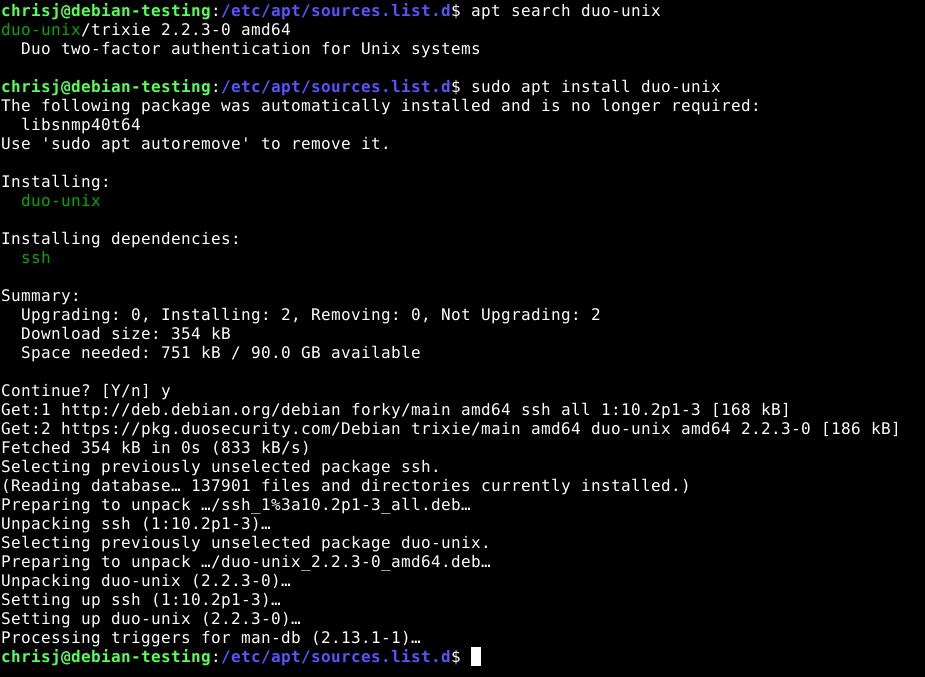
Completed Install of Duo Security Debian Package
The last step is to update /etc/duo/login_duo.conf and /etc/duo/pam_conf files. The instructions are on the Duo-Unix page.